会话台ai
Type ai to see every AI conversation on this Mac, grouped by project.
Enter picks one back up. Close the window and it keeps running.
Lists whichever of Claude Code, Codex and pi you have installed. huitai is a command-line tool that lives in your terminal. It is not a terminal and it does not use tmux: you keep Ghostty, Kaku or whatever you already use. The interface is in Simplified Chinese.
curl -fsSL https://github.com/dodo258/huitai/releases/latest/download/install.sh | sh
Downloads the prebuilt ai for your chip, checks its SHA256 and puts it in ~/.local/bin. No sudo. macOS only. Source on GitHub
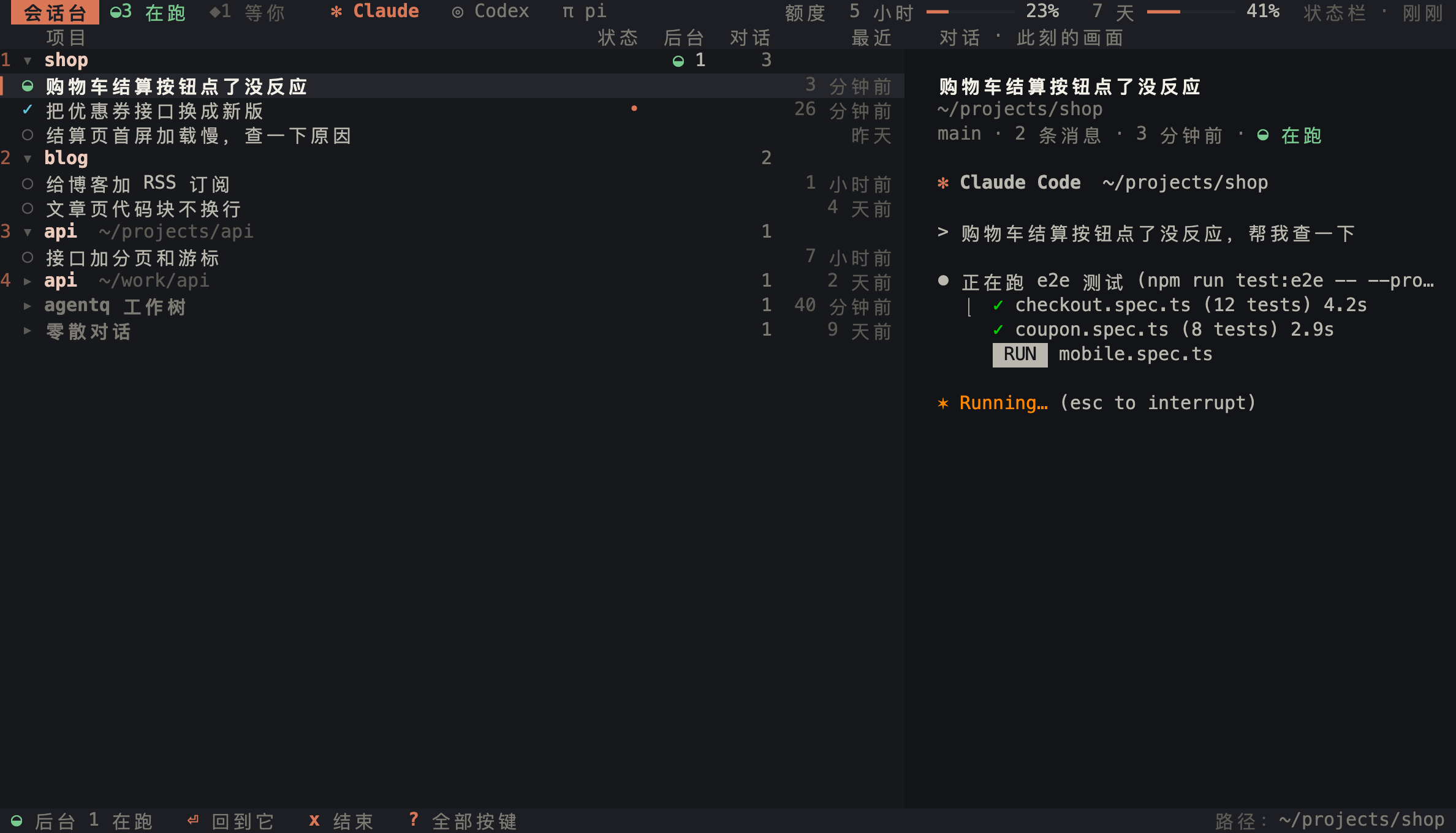
- Screenshots use made-up data.
- ◐running
- ◆waiting for you
- ✓just finished
- ○stopped
It does three things
- Find
- Conversations from all three tools in one place, grouped by project, newest first, with search over titles and message text. Type
aiinside a project directory and that project opens expanded. - Tab switch tool/ search
- Resume
- Enter opens the conversation in a new tab in its project directory; if it is already open, that tab comes to the front instead of a second one.
- Enter new tabw current window
- Keep running
- Conversations run inside huitai's own background daemon, so closing the tab or the whole terminal does not stop them. Press Enter later and the screen and history are still there. After a power cut, the interrupted ones are listed and can all be resumed with one key.
- q quit, daemon keeps goingR resume all
Your keys, untouched
huitai passes your keys and the CLI's output through untouched. In a chat tab, everything on the right behaves exactly as with the bare CLI.
Single-key shortcuts work with a Chinese input method on: huitai switches to an English layout while it is in front and switches back when you leave.
- Paste an imageCtrl+V
- Drop files into the windowjust drop them
- New lineShift+Enter
- Input methodstype as usual
- Tab titlesstart with the tool mark and project
✻ shop · …
Privacy
- Read-only
- Reads the three tools' session files on this Mac and never changes their configuration (
~/.claude/settings.json,~/.codex/config.toml,~/.pi/agent/). The only thing that moves their files is delete, which goes to huitai's trash and can be undone. - Nothing uploaded
- No uploads, no analytics, no telemetry. Renames, pins, archives and settings live in
~/Library/Application Support/huitai/. - Two network calls
-
- Claude's fallback quota source: when the status line data is missing, it asks Anthropic's official usage endpoint once using your local Claude Code login and caches the answer for 5 minutes. The credential is used in memory only, never written to disk.
- The new-version check: at most once a day, one request to GitHub Releases with no personal information, given up silently after 3 seconds. It never updates by itself. Turn it off in settings or set
HUITAI_NO_UPDATE_CHECK=1.
The keys you'll use most
Every action is a single key. The mouse works too: click to select, double-click to open, right-click for actions.
- Tab
- Switch tool
- ↑↓ jk
- Move
- /
- Search titles and text
- Enter
- Open in a new tab
- w
- Open in the current window
- n
- New conversation in this project
- !
- Next one waiting for you, any tool
- c
- Copy the resume command
- d u
- Move to trash / restore
- x
- End a background conversation
- q
- Quit; background keeps running
- ⌥Space
- Bring up huitai from anywhere
? shows every key. Not sure it is set up? Run ai doctor. Upgrade later with ai update.
Try it
Needs macOS. Opening conversations in a new tab needs Ghostty 1.3 or later or Kaku; other terminals open them in the current window. The interface is in Simplified Chinese.
curl -fsSL https://github.com/dodo258/huitai/releases/latest/download/install.sh | sh
cargo install --locked --git https://github.com/dodo258/huitai
The second line builds from source and needs a recent stable Rust. Developed and tested on macOS 27 with Apple silicon; the Intel build is compiled but not tested on real hardware.